USER GUIDE
Run your crew
with mate.
This guide takes you from a fresh clone to a working crew: install, set up a workspace, give your Mate its first task, answer crew questions, and land the result. mate is in active development, so this guide covers what ships in the current source.
Screenshots come from mate’s own render code with demo data. They are not a live session.
Overview
mate is a single Go binary that runs AI coding agents as a team on your machine. There are four ideas to know:
A folder that holds your projects. You open it with mate <dir>. All mate state lives in its .mate/ folder.
A named unit of work with zero or more Git repos, which are subfolders of the workspace. Each project has one Mate.
The project lead, Claude Code by default. It turns your requests into briefs, starts crews, supervises them, reviews their work and reports back. It never edits code itself. Its folder has no code in it.
A short-lived agent for one task, Codex by default. Each crew runs in its own Git worktree on its own branch mate/<crew>, in its own terminal tab.
You are the captain. You talk to the Mate. The Mate talks to the crews. The console is a narrow terminal panel that shows who is doing what and what needs your decision. Agents run inside Herdr, a terminal runtime for agents. The console opens any agent next to itself in your terminal, which must be WezTerm or Ghostty.
~/work/                        ← workspace
├── shop/                      ← a real git repo (the Mate never cds here)
├── blog/
├── .worktrees/shop-fix-cart/  ← crew fix-cart’s worktree, branch mate/fix-cart
└── .mate/                     ← all mate state
    ├── workspace.yaml   WORKSPACE.md   CREW.md   pricing.yaml
    └── projects/shop/
        ├── project.yaml   PROJECT.md   CREW.md
        ├── mate/          ← the Mate’s working folder: memory.md, backlog.md
        └── crews/         ← one folder per crew: brief.md, report.md, handback.md
A crew does one of two kinds of task:
- Ship: change code on a branch, then hand back with a
handback.mdacceptance table. It is finished when the branch is merged. - Scout: investigate and write a
report.md, with no code changes. It is finished when you accept the report. Durable findings go intoPROJECT.md.
Install
Prerequisites
| Tool | Version | Why |
|---|---|---|
| Go | 1.25+ | Builds the mate binary. |
| Git | any recent | Repos, worktrees and branches for crews. |
| Herdr | 0.8.2 | The terminal runtime every agent runs in. |
| WezTerm or Ghostty | Ghostty 1.3+ | Hosts the console and the agent column next to it. Any other terminal can run the console, but agents won’t open beside it. |
| Claude Code | signed in | The default Mate harness. A Mate must be Claude Code or Codex. |
| Codex CLI | signed in | The default crew harness. pi and Grok can also run crews. |
Beads bd + Beads Viewer bv | bd 1.3.1, bv 0.25.2 | Epics and tasks per project (the t key). |
| Fresh optional | — | Opens a crew’s report in a tab (the e key). brew install fresh-editor |
| quota-axi optional | 0.1.34+ | Shows harness quota when choosing a crew profile. |
Install Beads with brew install beads and brew install dicklesworthstone/tap/bv, or use the release archives. Check them with bd --version and bv --version. mate never downloads executables for you.
Build mate
git clone https://github.com/nguyenngocanh94/mate.git
cd mate
make build                  # produces ./bin/mate
./bin/mate --version
Put bin/mate on your PATH, for example by symlinking it into ~/.local/bin. The console looks for herdr and fresh on your PATH and also in ~/.local/bin, /opt/homebrew/bin and /usr/local/bin.
Quick start
-
Create a workspace
mate init ~/work
# initialized workspace at /Users/you/work
This creates
~/work/.mate/withworkspace.yaml,WORKSPACE.md,CREW.mdandpricing.yaml. Running it again on an existing workspace is safe. -
Add a project
A repo must be a Git repo inside the workspace. You can also clone one straight from a URL.
cd ~/work
git clone git@github.com:you/shop.git
mate project add shop shop
# added project shop: repos=shop(shop@main) mode=local-only yolo=false

# or: start with no repo, then clone one in
mate project add blog
mate project repo add blog https://github.com/you/blog.git
A project can hold several repos. Each crew works in exactly one repo. You can also create a project from the console with n.
-
Open the console
Open WezTerm or Ghostty, then run:
cd ~/work
mate console        # console + agent column, built right away
# or
mate ~/work         # console; the agent column appears on your first Enter
The console takes the narrow left column, about 20% of the window. The agent column on the right shows whichever Mate or crew you pick. On every open, the console also starts Herdr if needed, repairs moved paths, and resumes agents that were running before a reboot.
-
Start the Mate
Select the project and press Enter to open it. Then press s to create the Mate, or to resume it. Pick the harness (Claude Code by default), then press Enter on the Mate’s row to open its terminal in the agent column.
-
Give it a task
Type into the Mate’s pane like any chat, for example:
you › Add a Buy button to the end of README.md linking to our checkout page.The Mate checks what it already knows, writes a brief and spawns a crew. If something is your call, such as which URL to use, it asks you first. The new crew appears in the console tree a few seconds later.
The console
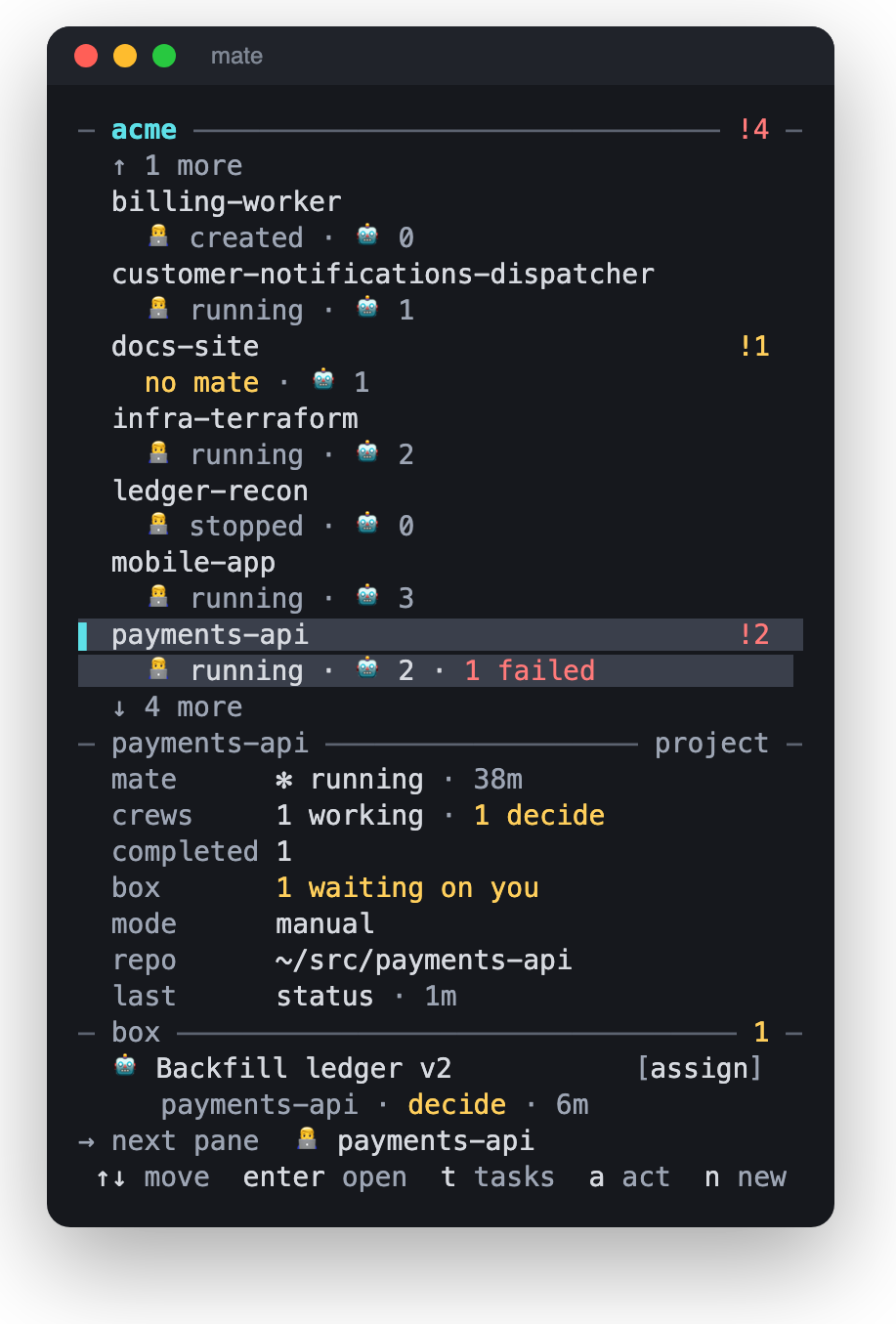
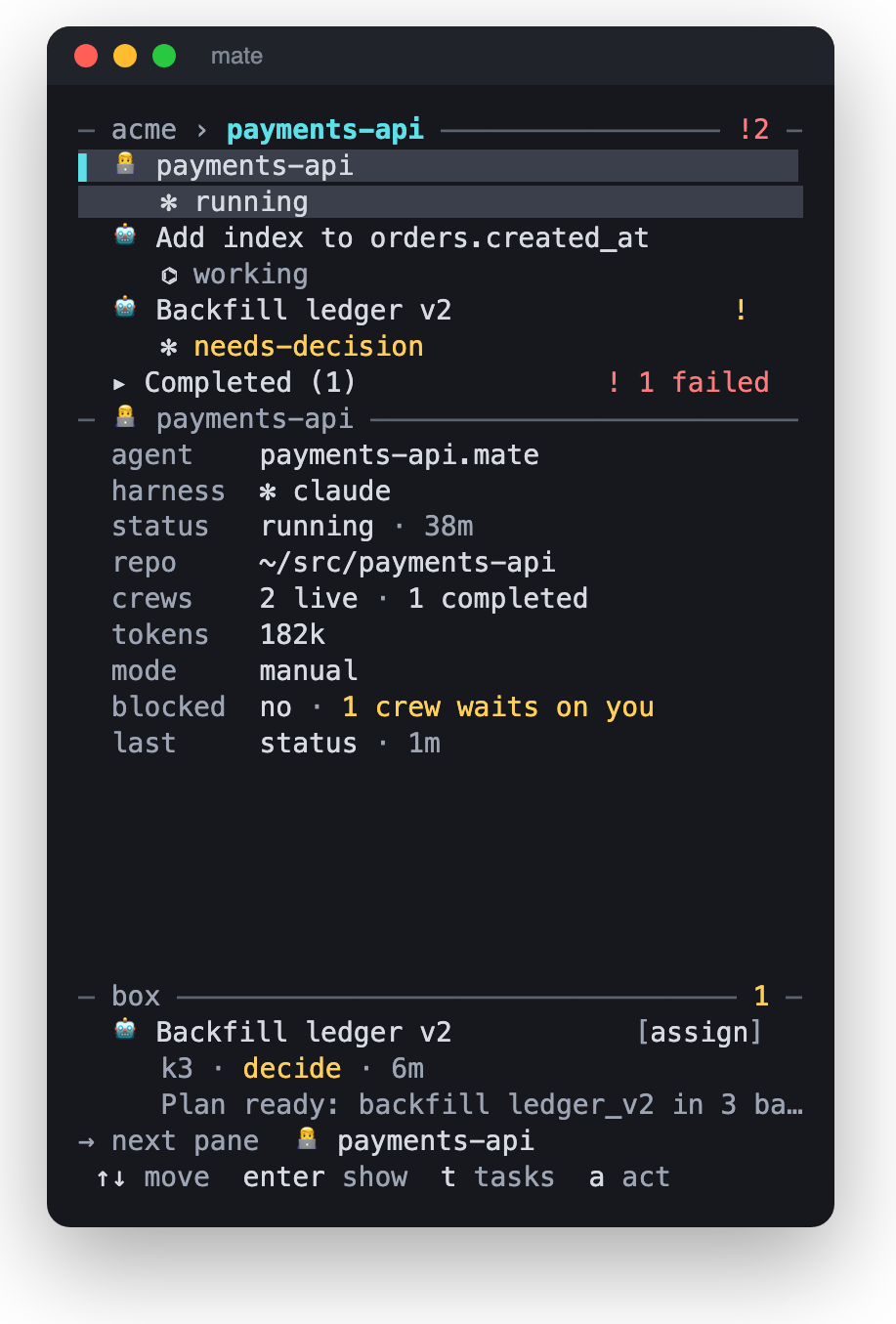
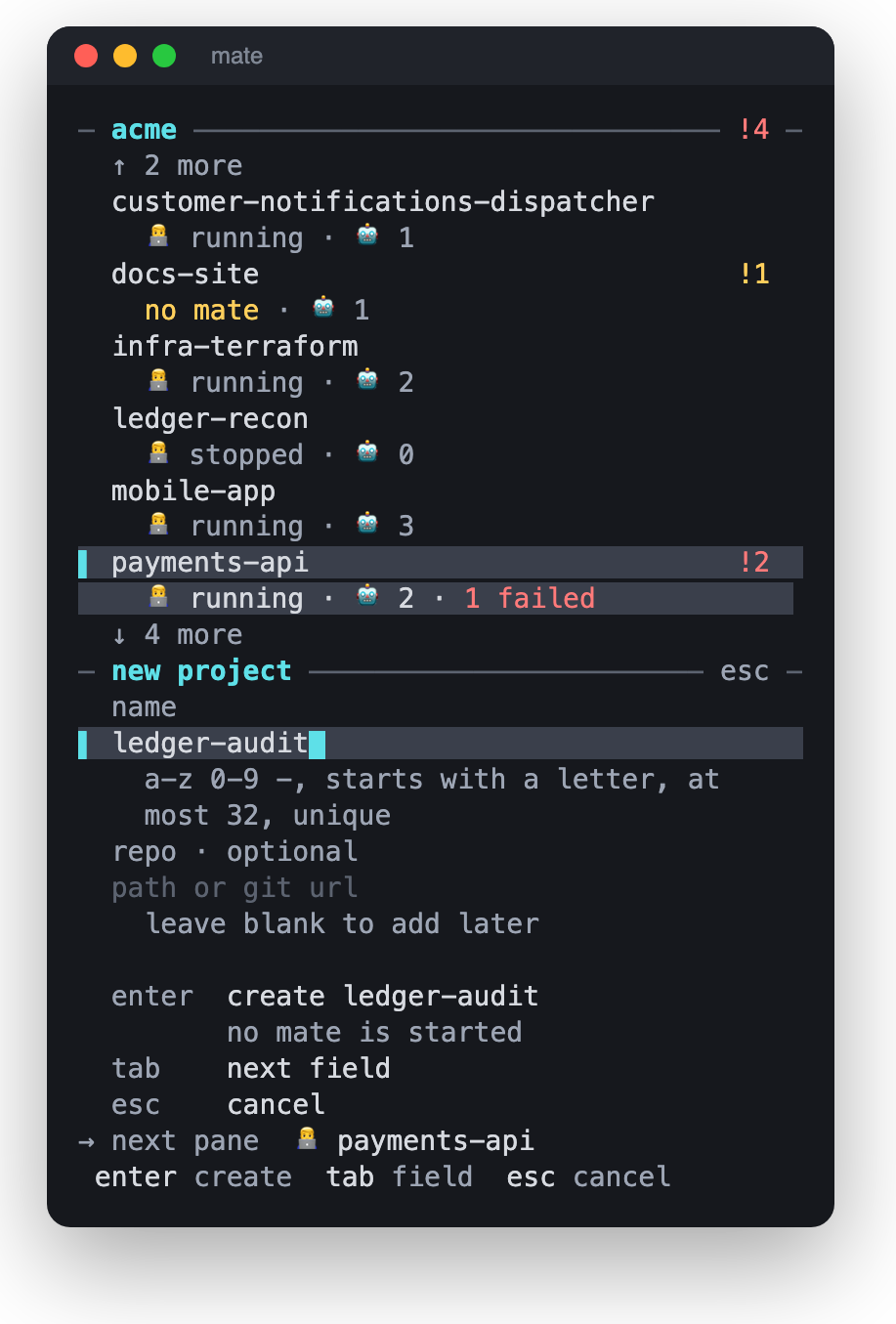
The console is mate’s control panel. It never draws an agent’s terminal itself. It tells your terminal host to open that agent in the next pane. It is one stack of three panes: the list, a detail panel for the selected row, and the box with things waiting on someone. Press Tab to move between them.
Reading a row
- Status words are coloured only when they need you, for example needs-decision.
- ! and a number means that many items need attention under that row.
- Harness icons: ✻ Claude Code, ⌬ Codex. With a Nerd Font 3.5 they become the real logos.
- The footer shows what → next pane is currently showing, plus the keys that apply right now.
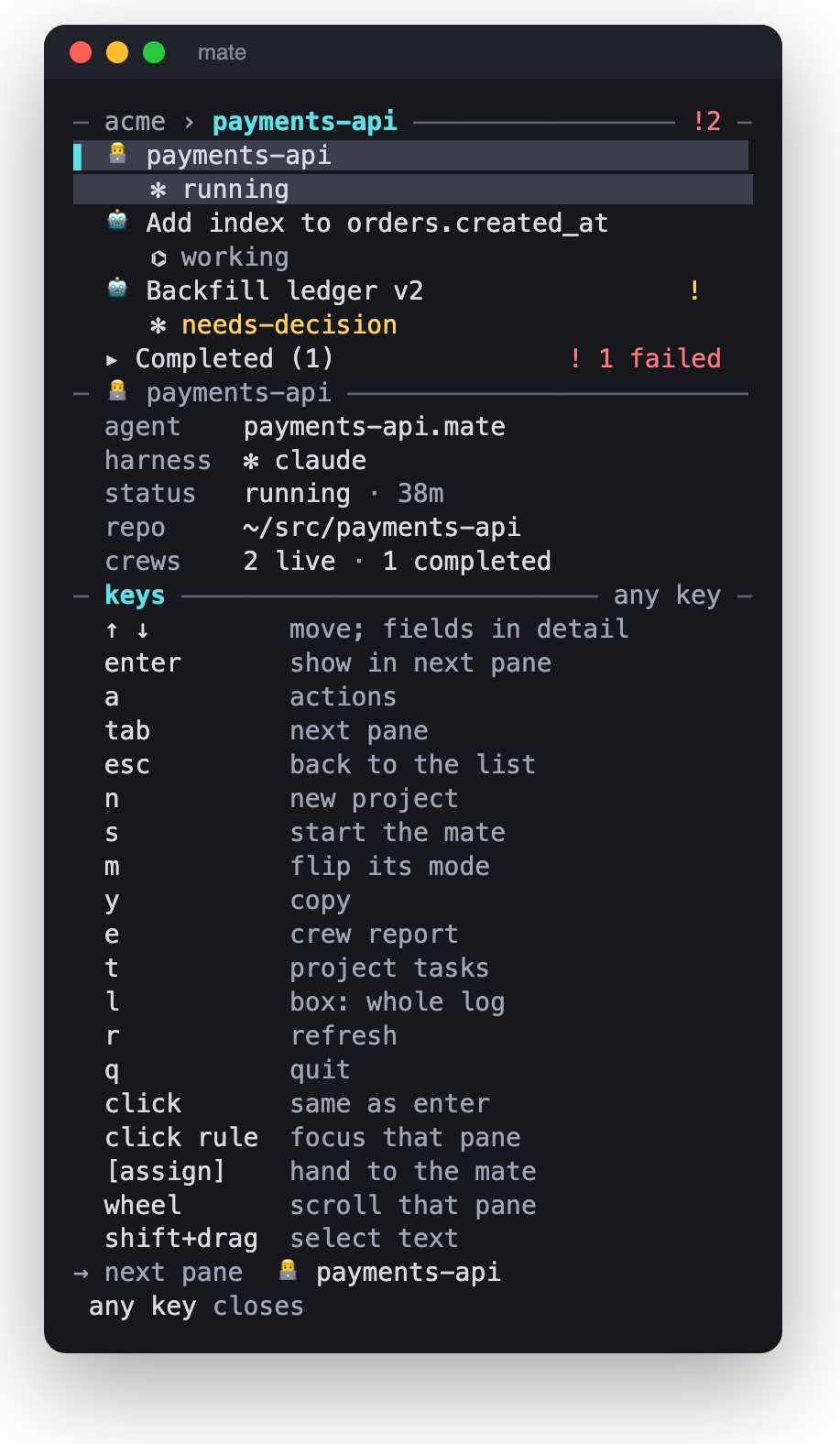
Keys
| ↑ ↓ / k j | Move. In the detail pane this moves between fields. |
| Enter | Open a project; on a Mate or crew, show it in the next pane; on a group, expand or collapse it. |
| Esc | Back to the list, or up one level (project → workspace). |
| Tab / Shift+Tab | Next or previous pane: list, detail, box. |
| a | Actions for the selected row. In the box it assigns the item to the Mate. |
| s | Create, start or resume the project’s Mate. |
| m | Switch the project between manual and auto mode. |
| n | New project. |
| e | Open the crew’s report (or its folder) in a Fresh tab. This works on stopped crews too. |
| t | Open the project’s tasks (Beads Viewer) in a tab. |
| l | Box: switch between waiting (default) and the whole log. |
| y | Copy the field or agent id under the cursor (OSC 52). |
| r | Refresh, or retry a step that failed. |
| PgUp PgDn g G | Half a page; first or last row. |
| ? | Key sheet. |
| q / Ctrl+C | Quit. |
The mouse works too. Clicking a row is the same as Enter, clicking a pane’s rule focuses that pane, clicking [assign] hands an item to the Mate, and the wheel scrolls. To select text, use Shift+drag, which your terminal handles.
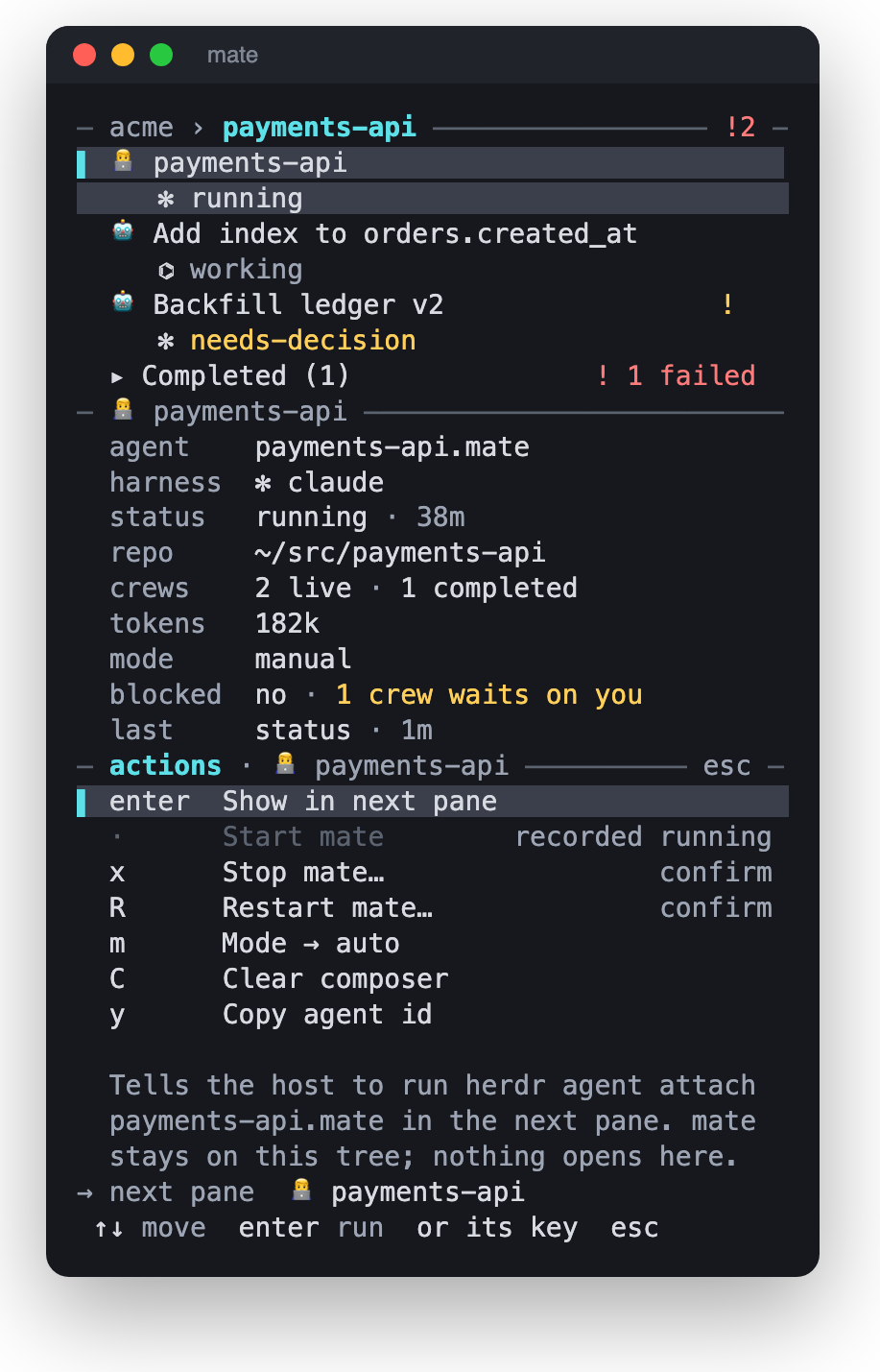
Actions by row
| Row | Actions |
|---|---|
| Project | Open · s start Mate · m mode · n new project · x remove project… |
| Mate | Show · s start/resume · x stop… · R restart… · m mode · C clear composer · y copy id |
| Crew | Show · d diff · M merge… (once it has handed back) · x stop… · R restart crew… · p repair binding… · y copy id |
Working with your Mate
Talk to the Mate in its own pane: select its row and press Enter. Describe outcomes, not steps. The Mate owns everything inside the project: briefs, which crew and model to use, supervision and review. You own creating and removing projects, the mode, and merge permission.
What happens after you ask
- Intake. The Mate checks its memory,
PROJECT.mdand earlier scout reports. If the project is new and unknown, it usually proposes an onboarding scout first, rather than guessing. - Brief. It writes
crews/<id>/brief.mdwith your words verbatim, what is already known, what to build (and what is out of scope), acceptance criteria that each have averify:step, and open decisions markeddecides: captainordecides: mate. mate rejects a brief that is missing any of these. - Dispatch. It chooses a harness, model and effort from the dispatch table (see Configuration), then spawns the crew in a new worktree and branch.
- Supervise. The crew reports in short status lines. Questions reach the Mate, or you.
- Hand back. The crew writes
handback.mdorreport.md. The Mate reviews it against your words and the acceptance list before it reads the diff, then reports to you.
Your standing rules
Write rules once and every agent follows them:
.mate/WORKSPACE.md: rules for every Mate, for example “ask before adding a dependency”..mate/CREW.mdand.mate/projects/<p>/CREW.md: rules added to the end of every crew brief, for example “runmake checkbefore handing back”..mate/projects/<p>/PROJECT.md: project context. The Mate maintains it from scout findings, and you can edit it.
Things the Mate is waiting on you for appear as news in the Mate’s detail panel. These are questions it asked and you haven’t answered yet, with their age. Answer them in the Mate’s pane.
Crew states
Each crew is in exactly one state, and only one party can set each state.
| State | Set by | Meaning |
|---|---|---|
spawned | Mate | Started; the crew hasn’t reported yet. |
working | Crew | Working; the line describes the current phase. |
needs-decision | Crew | Asked a question and stopped. It goes to the box. |
wait-mate | Crew | Done, or unable to finish and says why. It moves to Handed back. The task is still open. |
blocked | Console | The crew can’t speak for itself: it went quiet too long, or its agent disappeared from Herdr. It goes to the box, and clears on its own when the crew moves again. |
finished | Mate / you | Final: the ship was merged, or the scout report was accepted. |
failed | Mate / you | Final: the work was discarded, or the crew never came up. |
A crew never closes itself. Only mate crew stop (or a merge) ends a task. crew stop refuses while the branch has unmerged work unless you pass --discard. Stopped crews keep their folder under crews/<id>/, so reports and briefs stay readable.
Questions & the box
![Box pane focused: one item from crew k3 'Backfill ledger v2' that needs a decision, with an [assign] button.](img/console-box.png)
The box at the bottom of the console lists only unresolved items: a crew question nobody has answered yet, or a crew the console flagged as stuck. Each item says what it needs in plain words: needs an answer, stuck, quiet too long, agent gone, send wedged or over budget.
For each item you have two choices:
- Enter (or click): open that crew’s pane and answer it yourself, by typing one line.
- a or
[assign]: hand it to the Mate. The Mate answers what is within its authority and asks you in its own pane about anything that is your call. If the Mate is busy, the item waits in a queue and is delivered as soon as its prompt is free. The row then shows assigned, queued and later assigned HH:MM.
An item leaves the box when the crew actually gets an answer or writes a new status. Press l to see the whole log, every status line and message, for debugging.
Review & merge
When a ship crew hands back, it moves to the Handed back group. The Mate reviews it and tells you it is ready. Then you can:
- See the diff: crew row → a → d, or
mate diff <project> <crew>(--fullfor the whole patch). - Read the report: e on the crew row, or
mate report <project> <crew>. - Talk to the crew: Enter on its row opens its pane, where you can ask for changes.
- Merge: crew row → a → M, or
mate merge <project> <crew>.
mate merge only fast-forwards the crew branch into the repo’s default branch, and it never pushes. It refuses if the crew’s worktree has uncommitted changes, or if the branch needs a rebase. In that case the Mate asks the crew to rebase. A successful merge stops the crew and marks it finished.
By default only you can merge, and a merge requested by the Mate is refused. To let the Mate merge on its own, turn on yolo. The Mate picks up the change after it restarts.
mate project yolo shop on # or offFor a second opinion, the Mate can start an independent reviewer with mate review <project> <crew> --id <reviewer>.
Manual & auto mode
Manual default
Nothing is typed into the Mate’s pane unless you do it. You watch the box and either answer crews yourself or [assign] items to the Mate.
Auto
Every 90 seconds, if anything is new, the console sends the Mate one digest line that lists unanswered questions, stuck crews and fresh hand-backs, and the Mate acts on it. If nothing changed, nothing is sent.
Switch modes with m. Typing to the Mate yourself switches the project to manual, so a digest never talks over you. Once the Mate has replied and you have been quiet for 5 minutes, auto turns itself back on. If you chose manual with m, it stays manual. Every line the app types into the Mate starts with ⟦mate⟧, so the Mate can tell it apart from you.
Supervision and auto mode run inside the console process. Keep the console open while crews are working. With the console closed, nobody flags stuck crews and no digests are sent.
Task tracking
Each project has one Beads tracker at .mate/projects/<p>/.beads/ that holds epics, tasks, dependencies and priorities. The Mate uses it on its own: it checks for ready work, claims a task before dispatching a crew, links the crew to the task, and closes the task only after the work is merged or you accept the report.
- In the console, press t on a project to open Beads Viewer in a tab. In the viewer, E shows the epic tree, b the Kanban board, g the dependency graph, / searches and ? lists its keys.
- From a terminal,
mate tasks shopopens the same viewer, andmate tasks shop --listprints the tasks. - To change tasks by hand, use the wrapper. It locks the tracker for you:
mate beads shop -- create --title 'Checkout' --type epic --json
mate beads shop -- create --title 'Payment API' --type task --parent <epic-id> --json
mate beads shop -- ready --limit 10 --json
mate beads shop -- close <task-id> --reason 'Accepted delivery'
Everything after -- is passed straight to bd. To back up a project, copy the whole .beads/ folder. The JSONL export in it is not a backup.
Dashboard & Office
While the console is open, it also serves a read-only web dashboard at http://127.0.0.1:7777 and shows the address on its status line. To run the dashboard without the console:
mate dashboard ~/work --open                 # default 127.0.0.1:7777
mate dashboard ~/work --addr 127.0.0.1:7791
It updates live, and every number links back to the transcript line it came from. The dashboard only binds to localhost unless you pass --allow-remote. Be careful with that flag: the timeline quotes everything you typed.
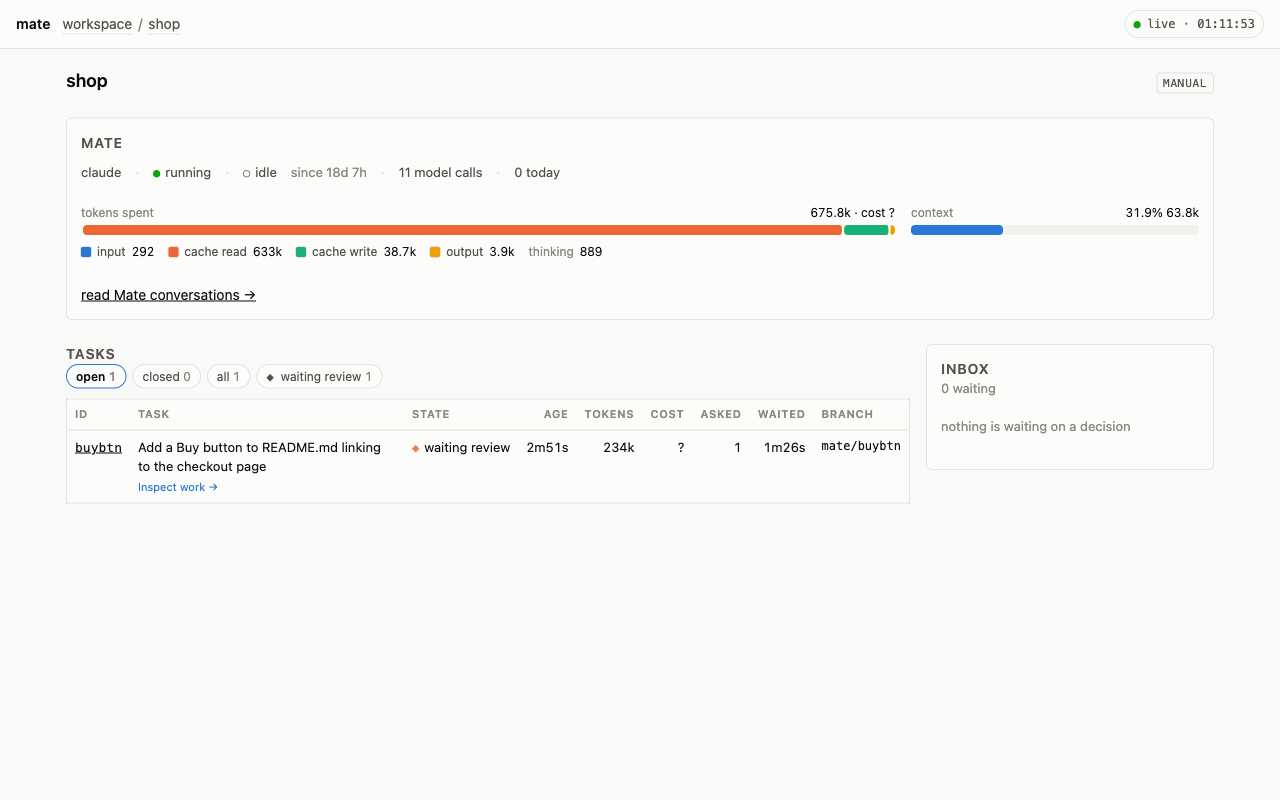
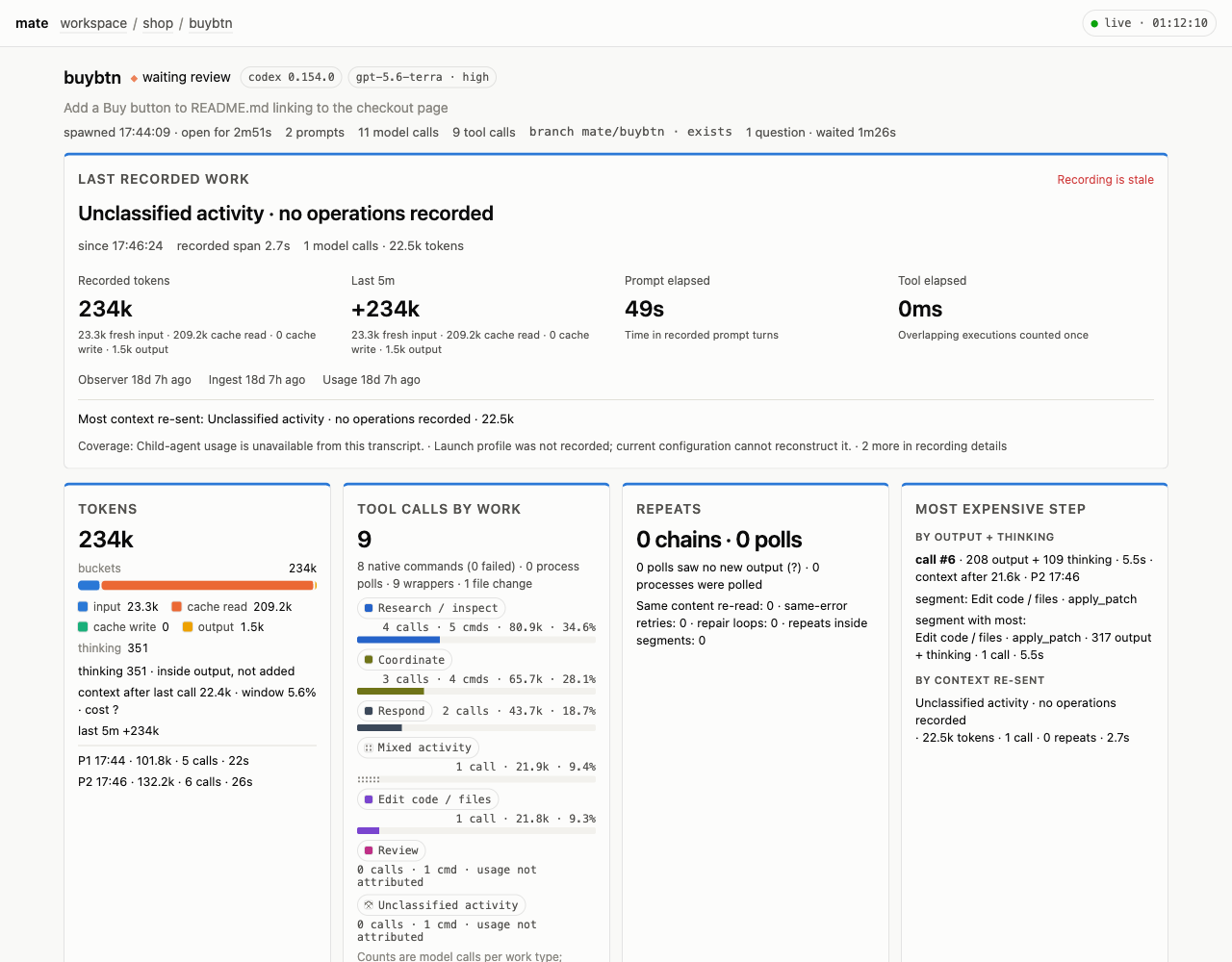
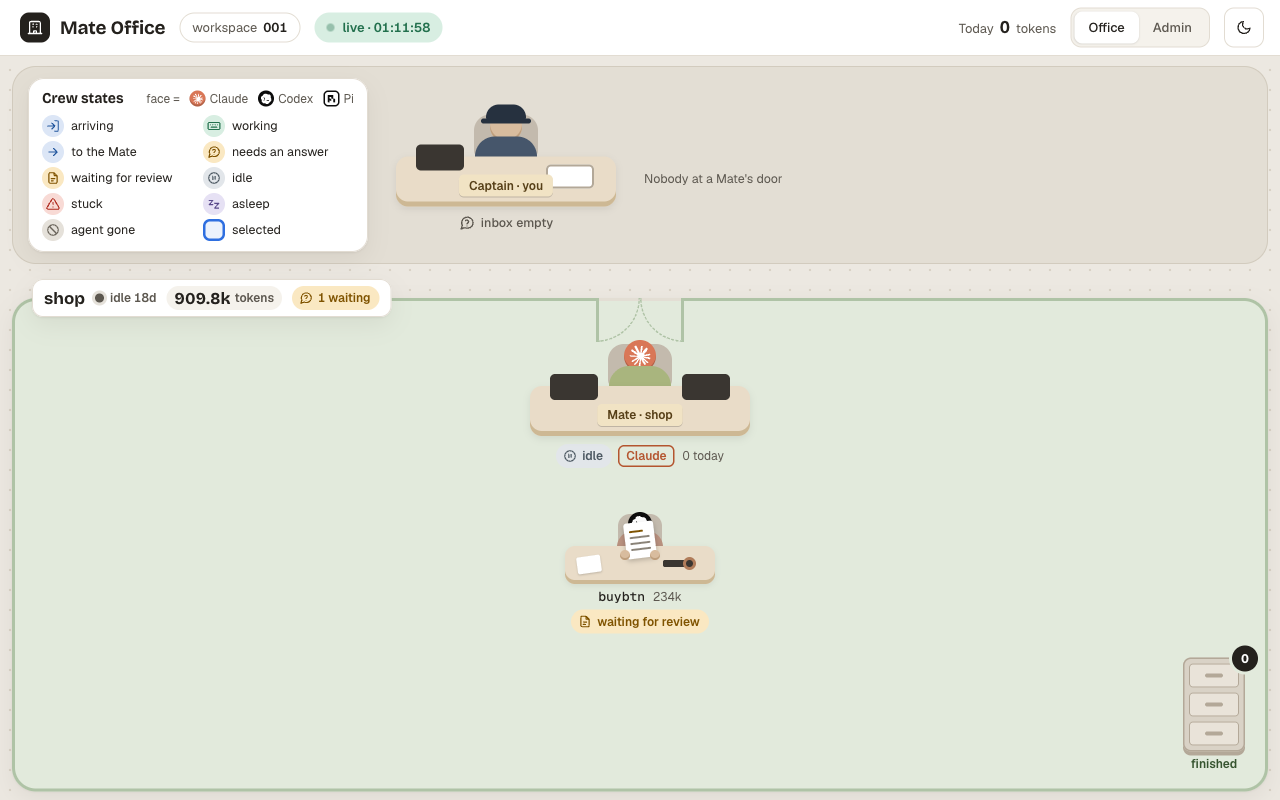
/office/). The same data as a floor plan: your desk, one room per project, a desk for each agent with its state, and a filing cabinet of finished crews.To find out where tokens went, run mate usage shop --top 5 for the most expensive tasks, or mate usage shop <crew> --why for one task. Fill in prices in .mate/pricing.yaml to see costs; an unpriced model shows ?. To cap spending, set a budget in project.yaml. A crew over budget then shows up in the box.
Configuration
project.yaml
# .mate/projects/shop/project.yaml
repos:
  - name: shop
    path: shop               # relative to the workspace
    default_branch: main
mode: local-only
yolo: false                  # true = the Mate may merge on its own
mate:
  model: opus                # Mate model override (default: opus)
  effort: medium
  refresh_context: 150000    # auto context refresh threshold; -1 disables
budget:
  crew_tokens: 2000000       # 0 or absent = no limit
  crew_usd: 5
  project_usd: 50
The default harnesses for new Mates and crews are under defaults: in .mate/workspace.yaml (mate_harness: claude, crew_harness: codex).
Choosing crew models
The Mate picks each crew’s harness, model and effort from a dispatch table: small ships get a mid-size model, large or risky changes get the strongest one. To see the current table, run:
mate crew dispatch                                        # current rules
mate crew dispatch --example > .mate/crew-dispatch.json   # start your own
Your .mate/crew-dispatch.json replaces the built-in table completely. If the file is broken, all spawns stop until you fix it, so a broken table is never applied silently.
Environment variables
MATE_WORKSPACE | Workspace to use when --workspace isn’t given. Otherwise mate uses the nearest folder above you that contains .mate/. |
MATE_KINDS | emoji · symbol · ascii: how Mate and crew rows are marked. Use it if the emoji misalign in your font. |
MATE_ICONS | nerd · unicode: force or disable Nerd Font harness logos. |
MATE_ASCII | 1 forces plain ASCII drawing; 0 forces Unicode. |
MATE_LOG_LEVEL | debug · info · warn · error |
Command reference
Commands accept --workspace <dir>. Exit code 2 means a usage error.
For you
mate [<dir>] | Open the console on a workspace. |
mate console [<dir>] | Console with the agent column built at once. |
mate init [<dir>] | Create a workspace. |
mate project add <name> [<repo>] [--yolo] [--budget-usd N] | Register a project. |
mate project list | remove <name> | yolo <name> on|off | List, remove, or allow the Mate to merge. |
mate project repo add <p> <path|git-url> | Add a repo (a URL is cloned). There are also repo list and repo remove. |
mate mate start <p> [--harness claude|codex] [--fresh] | Start or resume the Mate. --fresh starts a new session. |
mate mate stop | status | refresh <p> | Stop (saving memory), status, or a safe context refresh. |
mate crew list <p> [--all] | Open crews; --all adds handed-back and closed crews. |
mate crew stop <p> <crew> [--discard] | End a task, removing its worktree. |
mate crew relaunch <p> <crew> [--note "…"] | Restart a crew in a new session, keeping its branch and worktree. |
mate diff | report | merge <p> <crew> | Review and land a crew’s work. |
mate tasks <p> [--list|--json] · mate beads <p> -- … | Tasks in Beads. |
mate dashboard [<dir>] [--addr] [--open] | Web dashboard. |
mate usage <p> [<crew>] [--top N] [--why] | Token ledger. |
mate events <p> [--follow] [--narrate] | Event stream; --narrate tells it as a story. |
mate reindex [<dir>] | Rebuild .mate/mate.db from files and transcripts. Nothing is lost if the database is deleted. |
Used by agents
The Mate and crews call these from their panes. You rarely need them, but they are safe to run: crew spawn, send, peek, state, brief check|append, remember, memory check, recall, backlog, checkpoint, review, project facts, task-triage.
Troubleshooting
“no next pane” when I press Enter
The console couldn’t find a supported host. Run it inside WezTerm or Ghostty 1.3+. mate detects them from WEZTERM_PANE and TERM_PROGRAM=ghostty. Other terminals can show the console, but they can’t show agents next to it.
“herdr is not running”
The console starts Herdr when it opens. If Herdr dies while the console is open, quit (q) and reopen the console. Check that herdr is on your PATH or in /opt/homebrew/bin.
After a reboot my Mate and crews are gone
Reopen the console. On every open it resumes agents that were running, and the status line shows recovering n of m…. Crews you stopped on purpose stay stopped. If a row still shows an error, select it and press a → R to restart it, or s on a stopped Mate.
e says to install Fresh
Reports open in the Fresh editor: brew install fresh-editor. You can still read them with mate report <p> <crew>.
A crew is stuck or blocked
Press Enter on it to see its terminal. Often it is waiting on a dialog or has gone quiet. Type a line to unstick it, or [assign] the box item to the Mate. To start over on the same branch, use a → R (restart crew). To abandon it, use a → x, or mate crew stop <p> <crew> --discard.
Merge says the branch needs a rebase
The default branch moved on. Ask the Mate, or the crew directly, to rebase onto it, then merge again. mate never force-merges.
The Mate’s replies get slow or forgetful
Its context is filling up. Run mate mate refresh <p>. It saves the Mate’s memory, checkpoints, and restarts it in a fresh session that reloads that memory. In auto mode, a Claude Mate does this on its own above 150k tokens.
Rows look misaligned or show odd boxes
Your font draws the emoji or icons at the wrong width. Set MATE_KINDS=symbol (or ascii) and MATE_ICONS=unicode. If the console says it is too small, widen it to at least 32×14. 40–48 columns works best.
How do I remove a project?
Run mate project remove <name>, or use project row → a → x. It stops the crews and the Mate, then unregisters the project. Your repos and the project’s history under .mate/ stay on disk, so adding the project again with the same name brings its history back. Removal is refused while any crew has unmerged work.
Something unclear or wrong in this guide? Open an issue ↗